
Bank Statement Converters
Bank Statement Converters - PDF to Excel & CSV
Introduction:
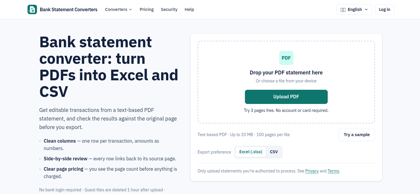
Bank Statement Converters turns PDFs into Excel and CSV, with transaction review, balance checks, and automatic file deletion.
Bank Statement Converters Product Information
What is Bank Statement Converters ?
Bank Statement Converters combines transaction extraction with source-page verification. It produces structured spreadsheets with numeric amounts and standardized dates, while checks help identify discrepancies before export.
Bank Statement Converters's Core Features
PDF-to-Excel and CSV conversion
Source-linked transaction review
Editable transactions with undo
Balance and duplicate checks
Automatic file deletion
Bank Statement Converters's Use Cases
#1
Preparing bookkeeping spreadsheets
#2
Reviewing transactions for reconciliation
#3
Organizing financial records
Bank Statement Converters's Pricing
Free trial: Three pages once, with Excel and CSV downloads; no account or payment card required.
Monthly plans: Starter USD 19 for 500 pages; Standard USD 29 for 1,000; Professional USD 49 for 2,000; Business USD 99 for 5,000.
Annual plans: Starter USD 136.80 for 6,000 pages; Standard USD 208.80 for 12,000; Professional USD 352.80 for 24,000; Business USD 712.80 for 60,000. Annual allowances are issued upfront.
One-time packs start at USD 19 for 300 pages and remain valid for 365 days.
Subscription pages expire at the billing period's end. Failed pages are not charged; edits and repeat downloads cost no additional pages. Prices exclude applicable taxes.
FAQ from Bank Statement Converters
Which formats are supported?
- It converts text-based PDF statements into Excel and CSV. Scanned PDFs are not currently supported.
What are the upload limits?
- Each file can contain up to 100 pages and 20 MB, covering one account and currency. Processing handles one file at a time.
Can users review the extracted data?
- Users can compare transactions with their source pages and correct extraction errors before exporting.
How are uploaded files handled?
- No bank credentials are required. The website states that guest files are deleted after one hour and account files after 24 hours.