
Image To Outline
Image To Outline - Photo to Line Art Converter
Introduction:
Image To Outline converts photos into line art, coloring pages, and tracing guides locally, with free PNG and PDF exports.
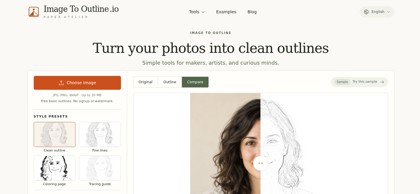
Image To Outline Product Information
What is Image To Outline ?
Image To Outline turns photographs into adjustable line drawings. Its browser workspace combines presets, comparison previews, and cleanup controls for drawing and printing projects.
Image To Outline's Core Features
Photo-to-outline conversion
Coloring and tracing presets
Detail and line-weight controls
Original-to-outline comparison
Local browser processing
Watermark-free PNG and PDF exports
Image To Outline's Use Cases
#1
Preparing drawing references
#2
Creating printable coloring pages
#3
Making tracing guides
Image To Outline's Pricing
Basic outlines and PNG/PDF downloads are free, without registration or watermarks.
FAQ from Image To Outline
Which inputs are supported?
- It accepts JPG, PNG, and WebP images up to 20 MB.
Does it create vectors?
- It exports raster PNG and image-based PDF files, not editable SVG paths.
Are photos uploaded?
- Processing runs locally in the browser; photos remain on the device.
Can outlines be refined?
- Users can adjust lines, crop, rotate, and erase unwanted marks.