
VidBG Remover
VidBG Remover AI Video Background Remover
Introduction:
AI video background remover that removes backgrounds online without a green screen in just a few clicks.
VidBG Remover Product Information
What is VidBG Remover ?
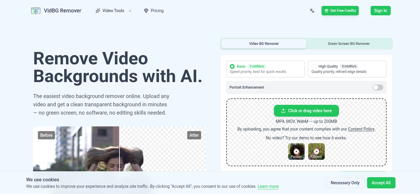
VidBG Remover is an AI-powered online tool that automatically removes video backgrounds without requiring a green screen. Using advanced subject segmentation, it isolates people and objects with precision while preserving video quality. Users can create transparent videos or replace backgrounds with custom images or videos for marketing, social media, e-commerce, and professional content creation. Its browser-based workflow eliminates complex editing, enabling fast and efficient background removal for creators and businesses.
VidBG Remover's Core Features
AI-powered video background removal
No green screen required
Automatic subject detection
Transparent video export
Background replacement with custom assets
Fast cloud-based processing
High-quality output preservation
Simple browser-based workflow
VidBG Remover's Use Cases
#1
Creating professional product videos with clean backgrounds
#2
Producing engaging social media videos for TikTok, Instagram, and YouTube
#3
Generating marketing videos with branded backgrounds
#4
Editing talking-head videos without studio equipment
#5
Creating online course and presentation videos
#6
Preparing promotional videos for e-commerce listings
VidBG Remover's Pricing
Starter: $9.9 one-time for 240 credits (~120 seconds of basic video background removal)
Creator: $29.9 one-time for 960 credits (~480 seconds), save 24%
Pro: $79.9 one-time for 3,000 credits (~1,500 seconds), save 35%
Max: $199.9 one-time for 12,000 credits (~6,000 seconds), save 60%
FAQ from VidBG Remover
What video formats does VidBG Remover support?
- VidBG Remover supports popular video formats such as MP4, MOV, WebM, and other commonly used formats for seamless background removal.
Do I need a green screen to remove video backgrounds?
- No. VidBG Remover uses AI-powered subject segmentation to automatically remove video backgrounds without requiring a green screen.
Can I replace the background after removing it?
- Yes. After the original background is removed, users can export a transparent video or replace the background with custom images, colors, or videos depending on the selected workflow.
How long does video processing take?
- Processing time depends on the video's duration and resolution. Most standard videos are processed within a few minutes using cloud-based AI.
Is VidBG Remover suitable for beginners?
- Yes. The platform is designed with a simple upload-and-process workflow, allowing users to remove video backgrounds without professional editing experience.
Can I use VidBG Remover for free?
- No. VidBG Remover operates on a pay-once credit system. Purchased credits never expire, allowing users to process videos whenever needed.