
Video Compressor
Online Video Compressor - Reduce Video Size
Introduction:
Compress videos online in your browser. Reduce file size quickly with privacy-focused local processing.
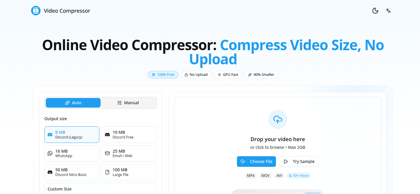
Video Compressor Product Information
What is Video Compressor ?
Video Compressor is a free online video compression tool designed to reduce video file sizes directly within the browser. By processing files locally, it helps users maintain privacy while optimizing videos for sharing, storage, websites, social media, and cloud uploads. The platform supports popular video formats and provides a fast, installation-free experience that works across desktop and mobile devices. Whether reducing storage requirements or speeding up uploads, Video Compressor offers a convenient solution for efficient video optimization.
Video Compressor's Core Features
Browser-based video compression
No video upload required
Local processing for enhanced privacy
Support for major video formats
Fast compression performance
Reduce file size while preserving quality
No software installation needed
Works across desktop and mobile browsers
Video Compressor's Use Cases
#1
Compressing videos before uploading to social media
#2
Reducing video size for email attachments
#3
Saving storage space on devices
#4
Optimizing videos for websites and landing pages
#5
Sharing large videos through messaging platforms
#6
Preparing videos for cloud storage backups
Video Compressor's Pricing
Free - Compress videos directly in your browser with no installation required.
FAQ from Video Compressor
What is Video Compressor?
- Video Compressor is a browser-based video compression tool that reduces video file sizes directly on your device. It helps users optimize videos for sharing, storage, and publishing without requiring software installation.
Does Video Compressor upload my videos to a server?
- No. Video Compressor is designed to process videos locally within the browser whenever possible, helping users maintain privacy and keep files on their own devices.
What video formats are supported?
- Video Compressor supports popular video formats including MP4, MOV, AVI, MKV, WEBM, and other commonly used video files, making it suitable for most personal and professional workflows.
Will compressing a video reduce its quality?
- Compression may slightly reduce visual quality depending on the selected settings, but the tool is designed to balance file size reduction and visual clarity for practical use cases such as sharing and online publishing.
Do I need to install any software?
- No. Video Compressor works entirely through a web browser, eliminating the need for downloads, installations, or account registration.
What can compressed videos be used for?
- Compressed videos are ideal for faster uploads, email attachments, social media sharing, cloud storage optimization, website publishing, and reducing device storage usage.